
The ever-evolving stack
Over the years, my homelab/home infrastructure has grown significantly in stability, maturity, whilst remaining relatively small. I don’t have a big rack at home, always kept it to a limited amount of machines and to what was actually useful in my daily life. However, as I dwelved more and more into building a proper, easy to use infrastructure, one thing became more and more complex: my DNS setup.
In the early days, I used an old Asus netbook running a few network services.
Those were the times of using dnsmasq with a few static records.
No zone definition or anything fancy like that.
At some point, I switched to pfSense.
DNS remained integrated to the router by using the integrated bind service.
Those were the days of creating proper zones, understanding zones transfer, and so so.
I also started using pfBlockerNG, which proved vastly superior to using an adblock extension in a web browser.
But then, the pfSense/OPNsense drama came up. Or rather, I uncovered it, some time after the split. The attitude of Netgate really did not sit well with me and I decided OPNsense was better aligned with my opinion of what a firewall distribution should be. To this day, I still don’t understand how Netgate can hope attacking a commercial market saturated with certification-bearing brands whilst being so condescending with their community can work, but to each their own. Maybe they’re seeing something I don’t.
Anyhow, with this switch to OPNsense came something else:
- I wanted to separate my local DNS management from the network gateway.
- I was losing the
pfBlockerNGgoodness.
At this point, I was a heavy user of the LXC features of Proxmox and had not migrated to Docker yet. I ended up with a fairly simple setup:
- Clients query a
dnsmasqserver listing on portUDP/53on the Ichibei node.- Local domains are served by a PowerDNS instance managed via the reference Web interface.
- Everything else is forward to Pi-Hole.
- Pi-Hole runs on its own container and gets its public records from
unboundrunning on the OPNsense gateway.
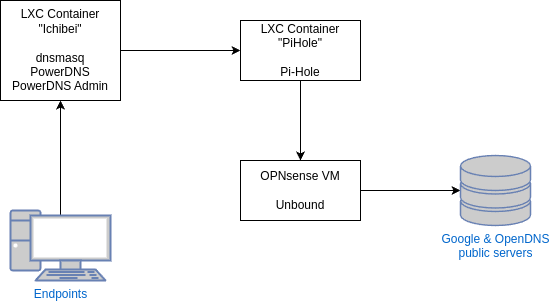
It was an immature, yet functional, approach to severing the DNS from the gateway and implementing a basic separation of duties.
At some point in the past 2 years, I decided it was time to dwelve into Docker and DNS was one of the first things I partially migrated. Managing the Pi-Hole LXC container was becoming tedious: with every upgrade a little something broke and the promise of a well-isolated, self-standing installation with proper dependency management was more than enough to convince me. I like doing sysadmin work, but I start hating it when things break too often.
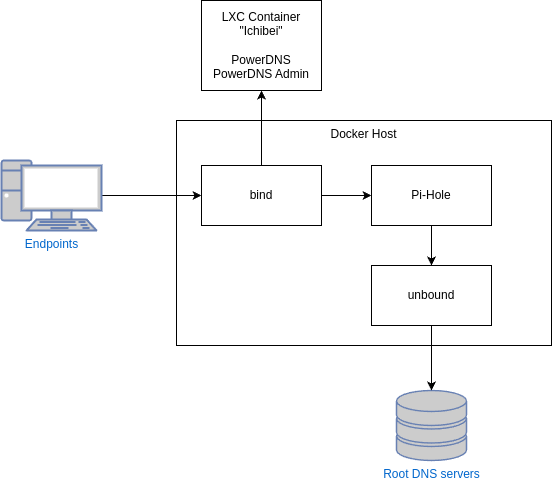
On the other hand, I couldn’t be bothered with migrating my PowerDNS setup. I ended up with a somewhat better, somewhat worse setup where most of the things are dockerized, but not everything:
bindreceives the queries and routes them.Pi-Holehandles queries to the outside world, relying on anunboundinstance querying directly root DNS servers (See this article for some backgound over this setup).PowerDNS, still running over LXC, handles local zones.
The 2025 revamp
Now that I have grown more comfortable with Docker, I am also more comfortable with the fact that everything can reasonably be moved away from barebone LXC should be. Because my network is a Proxmox shop, all my Docker nodes are actually LXC containers which. I am aware this an unpopular opinion, but I’ve never had any problem with this and it keeps me some form of homogeneity in my network while making maintenance work way simpler. Upgrading a Docker image, which can be done using many automations techniques, is way simpler than updating an LXC container and allows me to focus more on experimenting and creating.
There are also two other wins:
- I don’t need to maintain yet another Debian LXC layer whilst retaining proper compatibility with PowerDNS - I find the Debian/Docker couple way easier to maintain.
- When I first set everything up, I opted for a central
MariaDBcontainer that handles all databases. I’d like to steer away from this and use dedicated instances and am progressively doing so.
Proper use of Docker inside LXC requires enabling nesting. I am aware this slightly reduces the security level but this is a home network. General network segmentation, device vetting, avoiding opening ports for nothing and keeping stuff up to date is way more important than LXC nesting in terms of security in my threat model. If you want to replicate this in a serious production environment, use dedicated Docker hosts that are properly hardened.
My target architecture thus becomes:
bindreceives all queries and forwards them either toPowerDNS(internal domains) orPi-Hole.unboundqueries the root DNS servers.Nginx Proxy Managerreverse proxies all management interfaces.
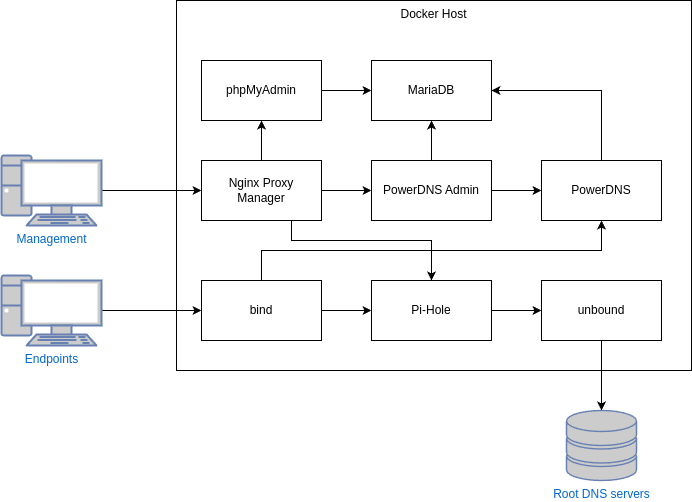
The architecture will we split into 4 subnets, all private (no access to host network) except dns-public:
- dns-public: External access to the network to handles queries (
bind), update blocklists (pi-hole) and query root DNS servers (unbound). - dns-internal: DNS-related exchanges between the different components of the stack.
This network uses static IP addressing, as DNS components tend to dislike using FQDN between each other even if
Dockerprovides internal name resolution. - dns-web: Internal reverse proxy subnet using by Nginx Proxy Manager to reach the final destinations.
- dns-db: Internal subnet for MariaDB-related exchanges.
This structure allows to retain a reasonable level of segregation and separation of duties.
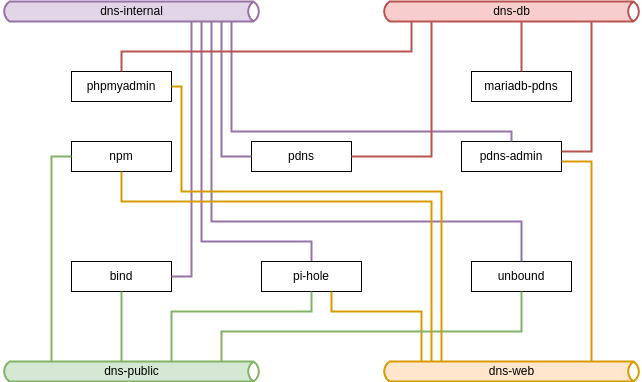
One might be tempted to say this is more complex than my previous architecture. It is not. This is more or less the same software stack, in a more consistent micro-services architcture, and with dedicated database instances instead of a relying on a big blob that hosts everything and its opposite.
Deployment
The resulting compose file is available here.
Be careful I use a lot of environment variables, and you will need to set them to have a working stack.
As a result, five ports are exposed:
- TCP/80 and TCP/443: Nginx Proxy Manager proxy hosts
- TCP/81: Nginx Proxy Manager management interface
- TCP/53 and UDP/53: bind DNS server
Everything else happens internally in the stack and is not exposed to the network.
Before this stack can work, some extra actions are required. In this kind of deployment, I tend to work by trial/error because I always forget something - so bear with me, the next steps will probably make some people scream. Remember I’m not a DevOps specialist - at best an enthousiast.
Also, note I’m not covering basic initial setup of the components of the stack - the web is full of thousands of tutorials about this and in this AI age, that wouldn’t bring any added value. I’m focusing on things that are either specific to my setup or gave me some challenge to get up and working.
Nginx Proxy Manager
After setting up the stack using Docker Compose (or, in my case, Portainer), the management interface of NPM is exposed on port TCP/81 with the default credentials.
Proxy hosts needs to be created to access the various management interfaces:
- PowerDNS:
http://dns-pdns-admin-1.dns_web:8080 - Pi-Hole:
http://dns-pdns-admin-1.dns_web:8080
bind
We configure bind to serve only configured zones (which will redirect to PowerDNS) and send everything else to Pi-Hole via its IP address.
bind does not play nice with FQDN’s (which makes sense: a DNS sets up resolution, it is fair enough is considers no name resolution is available).
named.conf.options
options {
  directory "/var/cache/bind";
  allow-query { any; };
  empty-zones-enable no;
  forward only;
  forwarders {
    172.17.44.3;
  };
  dnssec-validation no;
  listen-on-v6 { any; };
};
I set the dnssec-validation setting to no in a rush because I had issues with the PowerDNS local zones, without thinking ahead, which comes back to bite later.
named.conf.local : Create forward and reverse zones for all applicable internal zones, to be forward to PowerDNS, for instance:
zone "vpn.ev1z.be" {
        type forward;
        forwarders { 172.17.44.5 port 53; };
};

zone "0.16.172.in-addr.arpa" {
        type forward;
        forwarders { 172.17.44.5 port 53; };
};

zone "b.0.8.7.0.7.4.0.0.0.d.f.ip6.arpa" {
        type forward;
        forwarders { 172.16.44.5 port 53; };
};
unbound
On the host, install the DNS root servers information (assuming you’re using Debian like me):
apt install dns-root-data
unbound.conf
server:
        # Working directory
        directory: "/etc/unbound"
        # Log information without loggin queries
        verbosity: 1
        # Listen on all interfaces
        interface: 0.0.0.0
        # Use the root hints from the host to query information
        root-hints: "/etc/unbound/root.hints"
        # Send minimum amount of information to upstream servers to enhance privacy
        qname-minimisation: yes
        # Disable syslog output to have logs via Docker API
        use-syslog: no
        # Ensure privacy of local IP ranges
        private-address: 192.168.0.0/16
        private-address: 169.254.0.0/16
        private-address: 172.16.0.0/12
        private-address: 10.0.0.0/8
        private-address: fd00::/8
        private-address: fe80::/10
        # Allow queries from dns_internal subnet
        access-control: 172.17.44.0/28 allow

remote-control:
        control-enable: no
At this point, you end with a working setup.
bind will accept queries and leverage PowerDNS (internal names) and Pi-Hole with unbound(external names) to answer to all queries.
DNSSEC support
The recent versions of unbound will always use DNSSEC to validate DNS servers and protect against forgery, unless explicitly disabled.
This can easily be verified using dedicated tests hosts:
# docker exec -it dns-external-resolver-1 /usr/sbin/unbound-host -vDr sigok.ippacket.stream
sigok.ippacket.stream is an alias for sigok.rsa2048-sha256.ippacket.stream. (secure)
sigok.rsa2048-sha256.ippacket.stream has address 195.201.14.36 (secure)
sigok.rsa2048-sha256.ippacket.stream has IPv6 address 2a01:4f8:13b:2048::113 (secure)
sigok.rsa2048-sha256.ippacket.stream has no mail handler record (secure)

# docker exec -it dns-external-resolver-1 /usr/sbin/unbound-host -vDr sigfail.ippacket.stream
sigfail.ippacket.stream is an alias for sigfail.rsa2048-sha256.ippacket.stream. (BOGUS (security failure))
sigfail.rsa2048-sha256.ippacket.stream has address 195.201.14.36 (BOGUS (security failure))
validation failure <sigfail.ippacket.stream. A IN>: signature crypto failed from 127.0.0.11 and 127.0.0.11
sigfail.rsa2048-sha256.ippacket.stream has IPv6 address 2a01:4f8:13b:2048::113 (BOGUS (security failure))
validation failure <sigfail.ippacket.stream. AAAA IN>: signature crypto failed from 127.0.0.11 and 127.0.0.11
sigfail.rsa2048-sha256.ippacket.stream has no mail handler record (secure)
However, if we try the same thing from an endpoint using the bind server, we end up with:
$ dig sigok.ippacket.stream

; <<>> DiG 9.20.11-4-Debian <<>> sigok.ippacket.stream
;; global options: +cmd
;; Got answer:
;; ->>HEADER<<- opcode: QUERY, status: NOERROR, id: 58249
;; flags: qr rd ra; QUERY: 1, ANSWER: 2, AUTHORITY: 0, ADDITIONAL: 1

;; OPT PSEUDOSECTION:
; EDNS: version: 0, flags:; udp: 1232
; COOKIE: 85d83d10e202f9e00100000068daf8be82a4fc04ec1b18d8 (good)
;; QUESTION SECTION:
;sigok.ippacket.stream.         IN      A

;; ANSWER SECTION:
sigok.ippacket.stream.  2602    IN      CNAME   sigok.rsa2048-sha256.ippacket.stream.
sigok.rsa2048-sha256.ippacket.stream. 60 IN A   195.201.14.36

;; Query time: 40 msec
;; SERVER: 172.16.20.219#53(172.16.20.219) (UDP)
;; WHEN: Mon Sep 29 23:23:10 CEST 2025
;; MSG SIZE  rcvd: 129

$ dig sigfail.ippacket.stream

; <<>> DiG 9.20.11-4-Debian <<>> sigfail.ippacket.stream
;; global options: +cmd
;; Got answer:
;; ->>HEADER<<- opcode: QUERY, status: NOERROR, id: 64405
;; flags: qr rd ra; QUERY: 1, ANSWER: 2, AUTHORITY: 0, ADDITIONAL: 1

;; OPT PSEUDOSECTION:
; EDNS: version: 0, flags:; udp: 1232
; COOKIE: e6305e2384185c9a0100000068daf8c51d51b36a8929d86c (good)
;; QUESTION SECTION:
;sigfail.ippacket.stream.       IN      A

;; ANSWER SECTION:
sigfail.ippacket.stream. 2643   IN      CNAME   sigfail.rsa2048-sha256.ippacket.stream.
sigfail.rsa2048-sha256.ippacket.stream. 60 IN A 195.201.14.36

;; Query time: 20 msec
;; SERVER: 172.16.20.219#53(172.16.20.219) (UDP)
;; WHEN: Mon Sep 29 23:23:17 CEST 2025
;; MSG SIZE  rcvd: 133
There is no authentication data in the reply (missing ad from flags) and obviously no signature verification performed.
This got me curious and made me wonder if this is issue at bind level, hidden behind the behaviour of the dnssec-validation auto; parameter.
According to the documentation, this should enable DNSSEC.
Checking the bind cache folder also shows it did download the keys in its managed key database.
I then remembered I actually disabled DNSSEC in bind, without thinking ahead, and was convinced of the opposite.
The original problem is that I don’t sign my internal zones with DNSSEC, because a compromised internal DNS server is far-fetched in my treath model.
This is an affirmation I might revisit later when I revamp my internal PKI setup to make it easier to use, for the sake of improving technical knowledge, but I do not want to go there now.
This means what I need to do is tell bind to trust my unsigned internals zones, while still performing validation by default.
So, my bind config now looks like this:
...

        dnssec-validation auto;

        validate-except {
                <semi-column separated list of internal domains>
        };
...
I’m definitely automating a zone list export from PowerDNS to automatically update the bind configuration at some point.
Maintaining the internal zone list in three spots (PowerDNS, the bind zones and the bind exception list) manually won’t work in the long run.
DNSSEC also needs to be enabled in Pi-Hole.
After a quick bind reload (docker exec -it dns-bind-1 /usr/sbin/rndc reload), internal resolution still works (yay!) and I get DNSSEC-signed replies for public requests:
$ dig sigok.ippacket.stream
;; communications error to 172.16.20.219#53: timed out

; <<>> DiG 9.20.11-4-Debian <<>> sigok.ippacket.stream
;; global options: +cmd
;; Got answer:
;; ->>HEADER<<- opcode: QUERY, status: NOERROR, id: 29350
;; flags: qr rd ra ad; QUERY: 1, ANSWER: 2, AUTHORITY: 0, ADDITIONAL: 1

;; OPT PSEUDOSECTION:
; EDNS: version: 0, flags:; udp: 1232
; COOKIE: 3e01c87974071ab40100000068db0686aa74b525e7dd9196 (good)
;; QUESTION SECTION:
;sigok.ippacket.stream.         IN      A

;; ANSWER SECTION:
sigok.ippacket.stream.  3597    IN      CNAME   sigok.rsa2048-sha256.ippacket.stream.
sigok.rsa2048-sha256.ippacket.stream. 59 IN A   195.201.14.36

;; Query time: 440 msec
;; SERVER: 172.16.20.219#53(172.16.20.219) (UDP)
;; WHEN: Tue Sep 30 00:21:58 CEST 2025
;; MSG SIZE  rcvd: 129

$ dig sigfail.ippacket.stream

; <<>> DiG 9.20.11-4-Debian <<>> sigfail.ippacket.stream
;; global options: +cmd
;; Got answer:
;; ->>HEADER<<- opcode: QUERY, status: SERVFAIL, id: 56530
;; flags: qr rd ra; QUERY: 1, ANSWER: 0, AUTHORITY: 0, ADDITIONAL: 1

;; OPT PSEUDOSECTION:
; EDNS: version: 0, flags:; udp: 1232
; COOKIE: e36f47a83a674b5a0100000068db06a64df72d16af259789 (good)
;; QUESTION SECTION:
;sigfail.ippacket.stream.       IN      A

;; Query time: 40 msec
;; SERVER: 172.16.20.219#53(172.16.20.219) (UDP)
;; WHEN: Tue Sep 30 00:22:30 CEST 2025
;; MSG SIZE  rcvd: 80
The sigok domain returns DNSSEC authenticated data (ad flag in the header) and the sigfail domain returns a SIGFAIL domain, with no A record returned as a consequence.
Database management
Back in my very far away days of being a webmaster in the RPG Making community, phpMyAdmin was the go-to for database management.
It prove stupidly difficult to get working under the /pma despite doing everything according to the official documentation.
I ended up giving it its own hostname